

Prove What Your Content Delivers in Clicks, Rankings and AI Answers
Docket's content performance measurement is for marketing leaders who have to show what content delivers. It reads Search Console and GA4 read-only, shows which articles earn clicks and attention and which pages are one fix away, and checks every article at 30, 60 and 90 days against what was predicted.
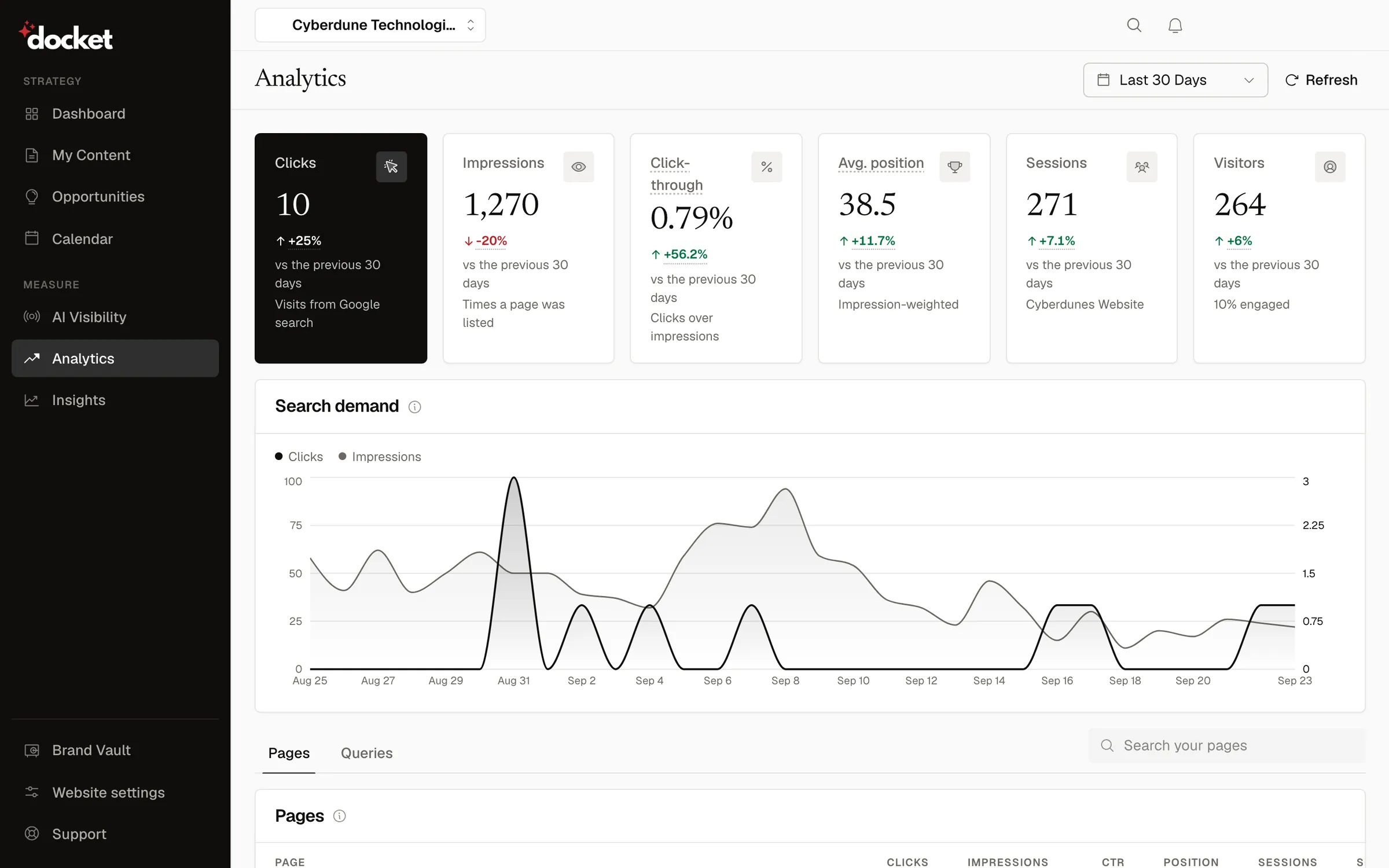
See Which Blog Posts Are Working, and Which to Fix
Every finding ends in something you can do: fix a page, write a topic, or leave it alone on purpose.
Search Console, per Page and Query
Clicks, impressions, CTR and position, each against the window before it.GA4 Engagement
Sessions, users and engagement rate, plus per-page views, bounce rate and engagement time.Insights That Point Somewhere
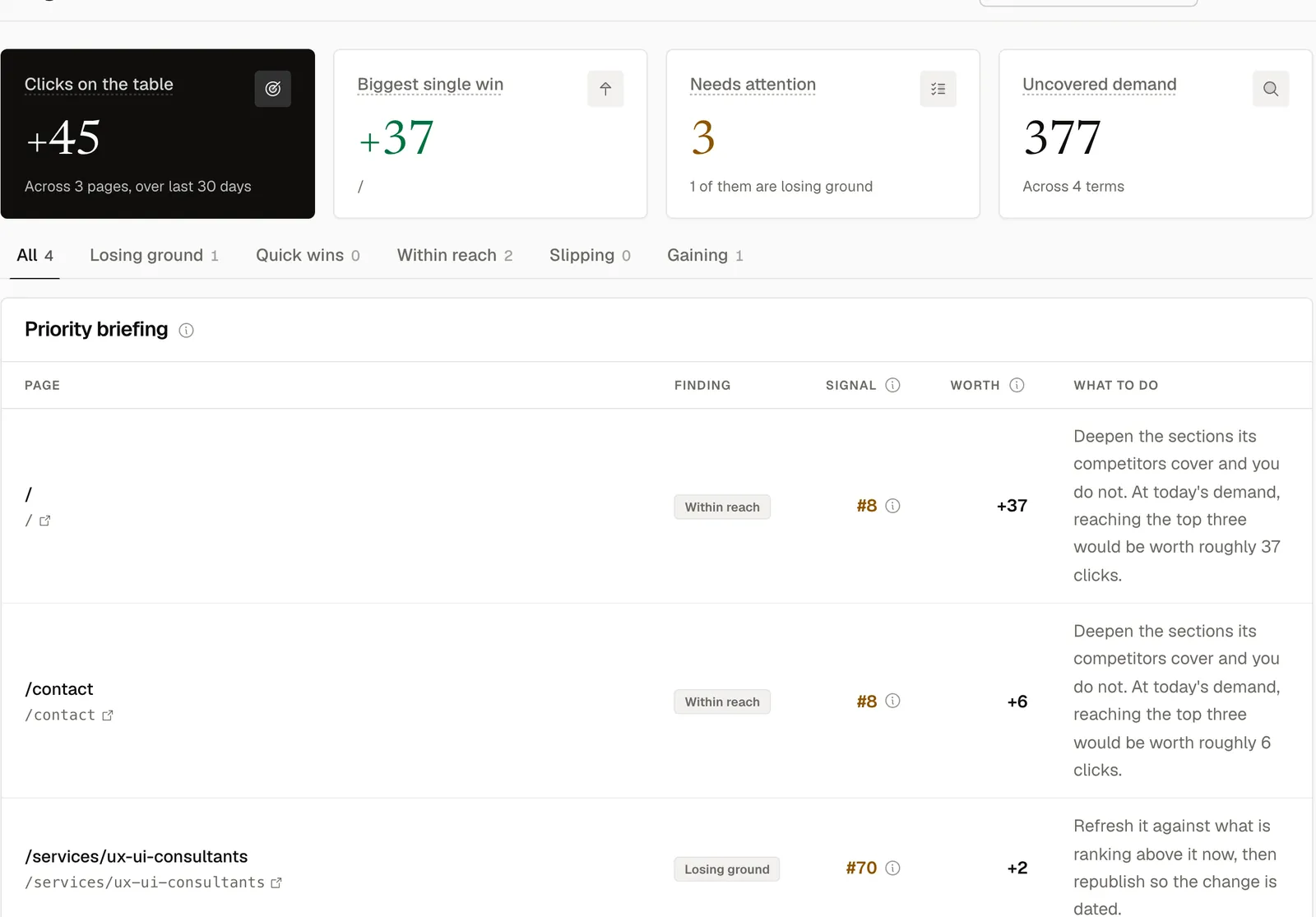
Quick wins, Within reach, Slipping and keyword gaps, plus Highlights and Lowlights.Missing Essential Pages
About, Contact, Terms and similar, spotted across every page Search Console reports.Audits for Any Page
Including pages Docket did not write. Optimise turns any audit into a fresh draft, ready to review.Outcomes at 30, 60 and 90 Days
Each article's predicted score against what it actually did.
What Does Docket Read From Search Console and GA4?
Docket connects to Google Search Console and GA4 with read-only access, per website, and reads search performance and engagement. It never writes to either.
| Source | What Docket Reads |
|---|---|
| Search Console | Clicks, impressions, CTR and average position by date, page and query, for the current window and the one before it |
| Ranges | 30, 60 and 90 days, 6 months and 12 months, each against the window before it where Search Console's 16 months of history allow |
| Lag | Windows allow for Search Console's roughly 2-day delay |
| GA4 Totals | Sessions, total users and engagement rate, plus sessions by landing page |
| GA4 per Page | Screen page views, users, bounce rate, engagement duration and sessions for the last 28 days |
| Access | Read-only scopes. Revoke any time from your Google account |
Insights, Sorted by What You Can Do
Four states, each with a rule you can check. Growth figures know that a lower position is better, and show New instead of an infinite percentage. See striking distance and content decay in the glossary.
- Quick winsPages clicked far below what their position should earn.
- Within reachPosition 4 to 20, with 50 or more impressions.
- SlippingPages losing ground against the previous period.
- Keyword gapsAverage position worse than 8 and up to 30, with 20 or more impressions.
How Does Content Performance Measurement Shape What Gets Written?
Search Console queries and ChatGPT answer losses feed next week's plan. Audits turn weak pages into drafts. Every article is read against its own prediction, and GA4 shows how readers engage.
- 01 · Read
Pull the Numbers
Search Console and GA4, per website, against the previous window. - 02 · Plan
Feed the Planner
Queries ranking 4th to 20th and their impressions shape next week's topics. - 03 · Fix
Audit and Optimise
Pages with 50+ impressions are audited automatically and re-read every 30 days. Refresh rewrites a live Docket article, saving a version first. - 04 · Check
Mark the Homework
At 30, 60 and 90 days, the predicted score is compared with what happened. The gap is stored.
Every Article Checked at 30, 60 and 90 Days
Docket goes back to check every prediction it makes, and writes the answer down where your team can see it.
- Predicted Opportunity Score Against Observed Performance
- Based on Clicks, Impressions and Position From Your Search Console
- The Gap Is Stored per Horizon: 30, 60 and 90 Days
- Kept as a Clear Record of What Worked and What to Improve
Content Reporting That Ends in a Fix, Not a PDF
| Topic | The Usual Way | With Docket |
|---|---|---|
| The Monthly Report | The Usual Way: Four hundred rows, opened once, filed forever. | With Docket: Quick wins, Within reach, Slipping and keyword gaps, each with a rule. |
| Old Pages | The Usual Way: Left alone, because they were written years ago. | With Docket: Any page Search Console reports can be audited and optimised into a fresh draft. |
| Did It Work? | The Usual Way: A hunch, delivered with confidence. | With Docket: Predicted score against observed performance at 30, 60 and 90 days. |
| Next Month's Plan | The Usual Way: Chosen the way last month's was. | With Docket: Search Console queries and ChatGPT answer losses feed next week's plan. |
Built on Your Own Google Data
Every number comes from your own Search Console and GA4, read with the access you grant and nothing more.

Read at 30, 60 and 90 days
Every published article
Read-Only Google Access
Docket never writes to Search Console or GA4, and you can revoke access any time. See how Docket stores your Google tokens.Positions as Google Reports Them
Positions and demand come straight from your Search Console, averaged the way Google shows them.Engagement From GA4
Sessions, users and engagement per page, so you see how readers respond to each article.Windows That Allow for Google's Delay
Comparisons account for Search Console's roughly 2-day lag, so partial days do not skew the picture.Outcomes on the Record
Gaps between prediction and result are recorded per article, so every result is visible and nothing changes silently.
Questions About Measurement
How do I know which blog posts are working?
Docket shows it per article: clicks, impressions, click-through rate and average position from Search Console, and views, users and engagement from GA4, each against the previous window. Insights then sort pages into Quick wins, Within reach, Slipping and keyword gaps, and every Docket article is compared with its predicted score at 30, 60 and 90 days.
What does Docket read from Google Search Console?
Docket reads clicks, impressions, click-through rate and average position by date, page and query, for the current window and the one before it. Ranges run 30, 60 and 90 days, 6 months and 12 months, allowing for Search Console's roughly 2-day lag.
Does Docket use GA4 data?
Yes, read-only. Docket reads GA4 sessions, total users and engagement rate, plus sessions by landing page. A per-page sync reads screen page views, users, bounce rate, engagement duration and sessions for the last 28 days, so you can see how readers respond to each article.
Does Docket track conversions or revenue from content?
Docket focuses on search performance and engagement rather than conversion or revenue attribution. It reads clicks, impressions and positions from Search Console and sessions, users and engagement from GA4, so you can see which articles earn visibility and hold readers' attention.
What are Quick wins and Within reach pages?
Quick wins are pages clicked far below what their search position should earn, usually a title or description problem. Within reach pages rank in positions 4 to 20 with 50 or more impressions, often called striking distance. Both are cheaper to improve than writing a new page from scratch.
Does Docket audit pages it did not write?
Yes. Any page Search Console reports can be scored for classic search, generative engines and Google AI Overviews, and pages with 50 or more impressions are re-audited every 30 days. Optimise turns an audit into a draft. For a page Docket did not write, that draft publishes as a new WordPress post; updating the original is done by hand.
What is the 30, 60 and 90 day outcomes check?
Thirty, sixty and ninety days after an article is published, Docket compares its predicted opportunity score with observed performance from Search Console. The gap is stored for each horizon as a clear record your team can review and act on.
Is Docket's Google access read-only?
Yes. Docket asks for read-only scopes only: your email address, Search Console read-only and Analytics read-only. It never writes to Search Console or GA4. Access tokens are encrypted at rest, and you can revoke access from your Google account at any time.
See Which of Your Pages Are One Fix Away
On a demo we connect read-only and walk through your Quick wins, Within reach pages and gaps.