

How Docket Turns Your Website Into Content That Ranks and Gets Cited
Docket's AI content workflow takes your marketing team from a website address to published WordPress posts. It reads your site, offers unlimited scored topics every week, drafts each article and grades it against 450+ checks, with your brand rules enforced before any post goes live.

450+ checks on every draft
Fixed rules, the same score every time
- Scored Topics a Week, per WebsitePick and choose what to write
- Unlimited
- Checks on Every DraftSEO, GEO, AIO and format checks
- 450+
- Words, MinimumPlus 10 to 14 FAQs per article
- 1,500
- Posts Checked Against Your RulesBrand safety, before anything goes live
- 100%
What Are the Steps in Docket's AI Content Workflow?
Six steps, in order: read your site, plan, draft, check, publish, measure. Docket automates the heavy lifting in all six, and your brand rules are enforced before anything goes live. Search Console queries and ChatGPT answer losses feed next week’s plan.
- 1
It Reads Your Website
You paste a URL. Docket reads the homepage and up to 4 more pages on the same site, copies up to 6 sentences word for word as voice samples, and names 5 real competitors. You get a filled-in brand profile to correct, plus a 3-month calendar and a first check of what ChatGPT says about you. - 2
It Plans the Week
Every week, each website gets unlimited topic ideas across six search intents. Pick the ones you want to become articles. Each is scored 0 to 100 from evidence, such as your Search Console demand. AI judgement is only a small, capped share, and a topic that would compete with a page you already have is heavily penalised. - 3
It Researches and Drafts
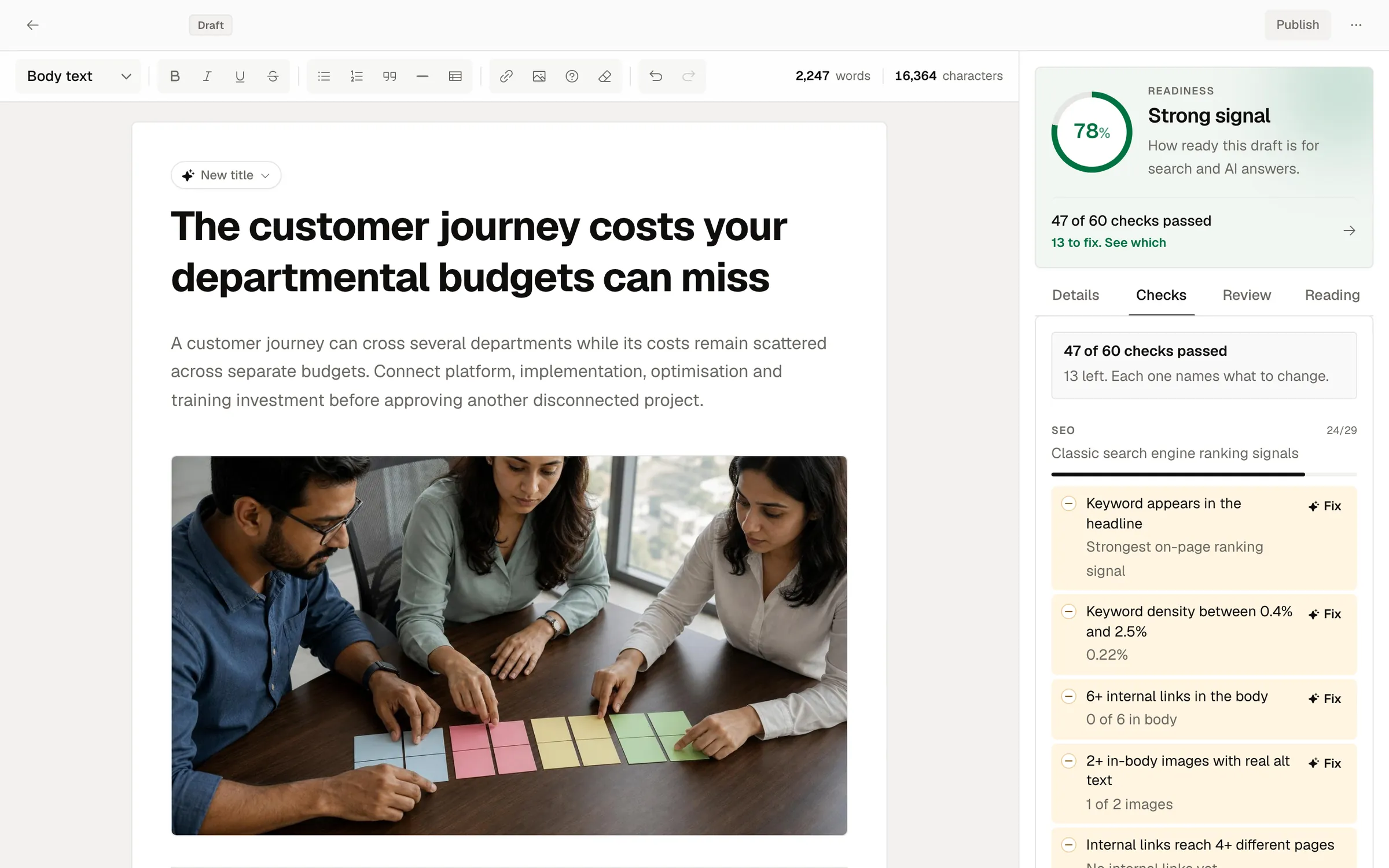
Drafts are at least 1,500 words, with 10 to 14 FAQs, a hero image and up to 2 body images, captioned and alt-texted. For “best of” pieces it searches the live web first and names only what it found. Internal links go only to pages that exist. - 4
It Checks 450+ Ways, Then You Edit
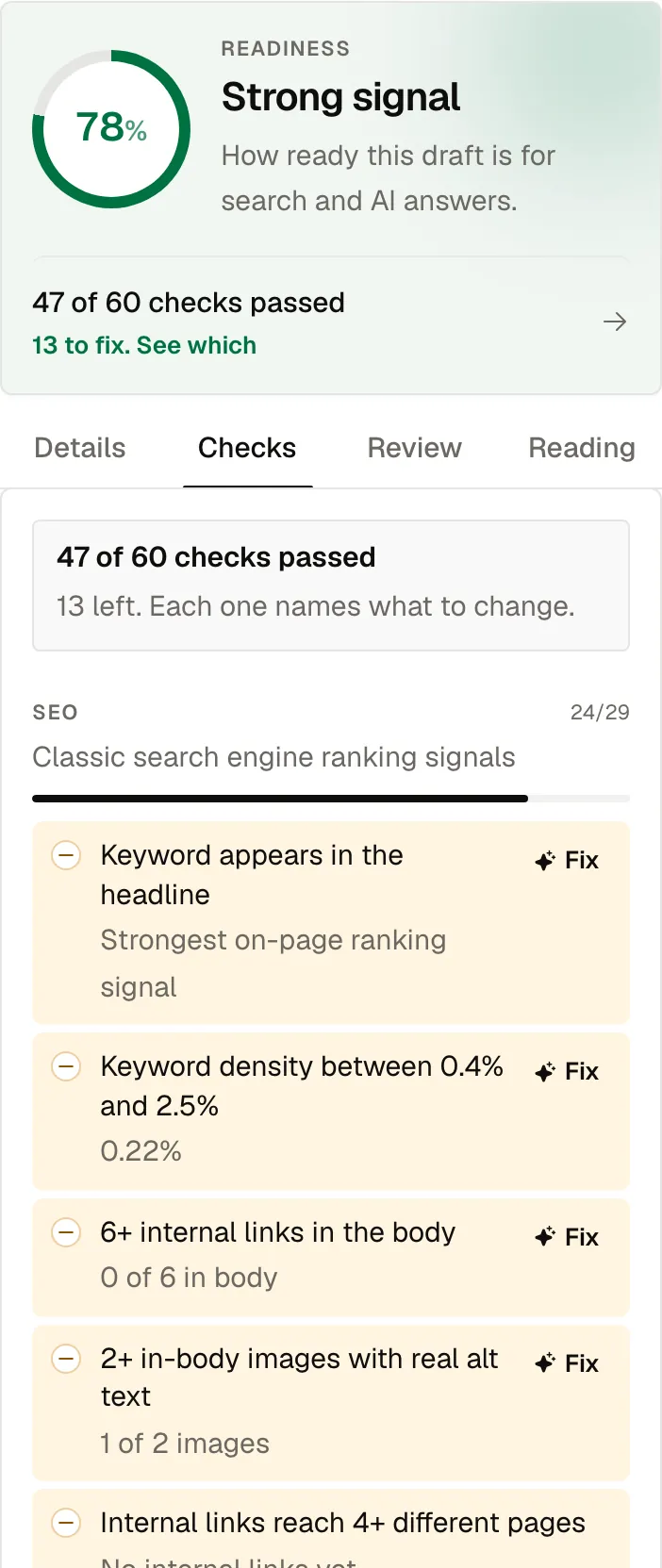
SEO, GEO, AIO and format checks, all fixed rules. A polish pass fixes the easy failures, then a separate review reads the whole draft and repairs what it finds. It opens in a full editor with every check beside it: most have a one-click fix, and every fix keeps to your facts. Docket keeps 20 versions of each article, saved before any AI rewrite. - 5
Publish Now or on a Schedule
Publish straight away, or schedule it: scheduled posts go out within about an hour of the chosen time. Brand rules are checked first, and they block a publish that breaks them. - 6
It Measures What Happened
Docket reads Google Search Console and GA4, read-only, and asks ChatGPT your buyers' questions. Search Console queries and ChatGPT answer losses feed next week's plan. Each post is also read at 30, 60 and 90 days and recorded beside its prediction.
Agentic Automation, Governed by the Rules You Set.
Docket researches, plans, drafts, checks and repairs while you get on with your day. Every post is held to your brand rules, ready to publish now or on a schedule.
Rules are enforced on every post, every time: a banned word or a missing disclaimer blocks the publish.
Docket Does
- Reads your site and builds the brand profile
- Offers unlimited scored topics every week, per website
- Researches, drafts and adds images
- Grades each draft against 450+ checks and repairs it
- Checks brand rules before anything goes live
- Reads Search Console, GA4 and ChatGPT answers
You Set
- The brand profile, tone and voice
- Banned words, banned claims and competitor rules
- Required disclaimers, matched word for word
- A mandatory fact check against your own facts
- Autonomy: suggest topics, or write full drafts
- Publishing permissions and the schedule
What Does Docket Send to WordPress? Every Field, Then It Checks.
Docket publishes to WordPress posts through the REST API, with an application password you can revoke. No copy-paste, and the alt text is already there.
Then it reads the fields back, because WordPress saying “200” and WordPress saving your SEO title are two different things. Docket fills every SEO field your plugin exposes over REST, and shows you exactly what was saved, field by field.
- Title, Body, Excerpt and Slug
- Featured Image With Alt Text, Title and Caption, in Your Own Media Library
- Categories and Tags
- The Yoast SEO, Rank Math or SEOPress Fields Your Site Exposes Over REST
- JSON-LD Schema: BlogPosting Always, FAQPage and Others Only When Earned
- A Publish Lock, So a Double Click Never Makes Two Posts
What Does Docket Measure After You Publish?
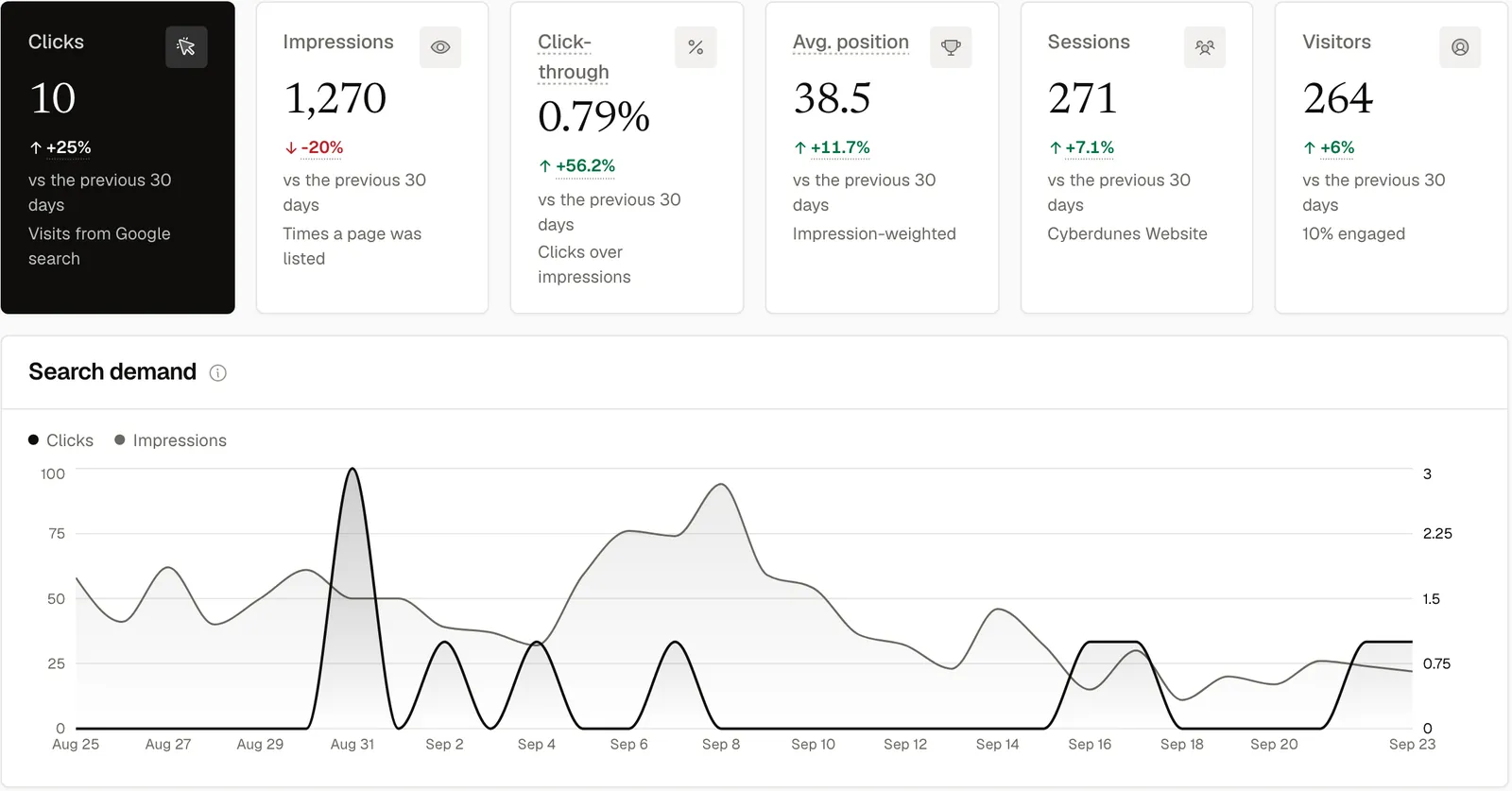
Clicks and rankings from Google Search Console. Sessions and engagement from GA4. What ChatGPT says when your buyers ask. All read-only.
Each post is checked at 30, 60 and 90 days against what Docket predicted, so you can see how every piece is performing.
- Clicks, Impressions, CTR and Average Position, by Page and Query
- Sessions, Users and Engagement Rate From GA4
- ChatGPT Share of Voice, Reported With a Low and High Range
- Answer Gaps: Where a Competitor Was Named and You Were Not
- Queries Ranking 4th to 20th and ChatGPT Answer Losses, Fed Into Next Week's Plan
How Do You Automate Content Marketing Safely? Set the Rules Once.
Set the rules once. Docket writes every draft to them, then checks every draft against them before it can go live, consistently, every time.
Autonomy Level
Two settings: suggest (propose ranked topics) or draft (research and write complete drafts, checked and ready to publish). Draft is the default.Banned Words and Claims
Set words and claims that must never appear. They are matched across title, meta, excerpt and body, and a match blocks the publish.Required Disclaimers
Lines that must appear word for word. If one is missing, the article cannot go live, whoever publishes it and whenever.Competitor Safety
A competitor named in the title, meta or excerpt, or a link to a competitor's site, blocks the publish. A factual comparison in the body is fine.Publishing Permissions
Set the approval role to Owner and only a workspace owner can publish. Make the fact check mandatory and a flagged article cannot go out.Tone and Voice
Tone rules go straight to the writer. The voice samples are your own sentences, so it copies your voice, not a paraphrase of it.
Graded for Google, and for the Answer That Shows Up Before the Link.
Every draft is checked for SEO, for GEO (generative engine optimisation: whether an AI answer engine can quote and credit it) and for AIO (whether Google AI Overviews can lift it cleanly), plus format checks.
Every check is a fixed rule, so the same article always gets the same score, and your team can see exactly what to improve.

Brand rules on every post
A failed rule blocks the publish
Built for Speed and Trust.
Deliberate choices that keep every post on-brand and every result easy to trust.
Rules Checked Before Anything Goes Live
Banned claims, required disclaimers and competitor mentions, on every post.Focused on WordPress Posts
Every post field sent, your SEO plugin filled, and all of it read back.ChatGPT, Measured Live
Questions asked with live web search, so readings reflect what buyers see.Facts Checked Against Your Brand
The optional fact check compares each draft with the facts in your brand profile.Edit at the Level You Want
Run a single Fix, edit by hand, or regenerate the article, with 20 versions saved.Every Post, Followed Over Time
Readings at 30, 60 and 90 days, recorded beside each post's prediction.
How your WordPress and Google access are handled is on the security page. Who builds Docket is on about us.
AI Content Workflow Questions, Answered.
How does Docket work?
Docket runs an AI content workflow in six steps: it reads your website, offers unlimited scored topics every week, drafts each article with images, grades it against 450+ checks and publishes it to WordPress, now or on a schedule. Then it measures in Search Console, GA4 and ChatGPT. Search Console queries and ChatGPT answer losses feed next week's plan.
How does Docket decide what to write about?
Docket scores each topic from 0 to 100 using evidence: Search Console demand, room to grow, answers where ChatGPT named a competitor, business fit and season. AI judgement is only a small, capped share. A topic that would compete with a page you already have is heavily penalised, so the queue holds only topics worth writing.
What lands in WordPress when a post is published?
Docket sends the title, slug, excerpt, body, featured image with alt text and caption, categories, tags and JSON-LD. Body images move into your media library. It also writes the Yoast SEO, Rank Math or SEOPress fields your site exposes over REST, then reads everything back and reports anything it could not write.
Can I edit a Docket draft before it goes live?
Yes. Every draft opens in a full editor with the 450+ checks beside it. You can edit by hand, run a one-click fix on most checks, or regenerate the whole article. Docket keeps 20 versions of each article, saved before any AI rewrite, and a restore can itself be undone.
What happens if a Docket draft fails its checks?
Docket's checklist is advisory, so a failed check never blocks you from publishing. A draft that fails the separate review after its repair passes waits as a draft marked Needs review. Your brand rules are different: a banned word, a banned claim or a missing disclaimer does block the publish.
Can I schedule posts in Docket?
Yes, Docket can schedule posts: pick a date and time in the editor and the article is scheduled. Docket publishes it within about an hour of that time. Brand rules are checked first: if a scheduled post breaks one, it comes off the schedule and the reason is shown, so you can fix it and reschedule.
What does Docket measure after an article is published?
Docket reads clicks, impressions, click-through rate and average position from Google Search Console, and sessions, users and engagement from GA4, both read-only. It asks ChatGPT the questions your buyers ask and reports share of voice with a range. Each post is compared with its prediction at 30, 60 and 90 days.
Does Docket measure Google AI Overviews or Perplexity?
Docket measures ChatGPT, with live web search on, so every reading reflects the answers buyers actually see. Other answer engines are not measured today. Up to 100 questions can be tracked per website, and each measurement stands for 7 days, refreshes automatically, and can be refreshed sooner.
Six Steps, Run on Your Website, Not a Sample One.
Book a demo and we will walk through it with your site on screen. Or run the free check and see what ChatGPT says about you today.